
- 바코드 생성하기
- ViewBag
- 맥 오라클설치
- Mac Oracle
- asp.net Select
- asp.net core swagger
- 강제이동
- ASP.Net Core 404
- asp.net core Select
- 타임피커
- 하드 마이그레이션
- XSS PHP
- simpe ftp
- jquery 바코드생성
- swagger 500 error
- javascript redirection
- javascript 바코드 생성
- asp ftp
- django 엑셀불러오기
- TempData
- JavaScript
- 하드 윈도우 복사
- 말줄임표시
- XSS방어
- 404에러페이지
- 원격ftp
- asp.net dropdownlist
- ViewData
- SSD 복사
- php 캐쉬제거
웹개발자의 기지개
[ASP] 메일발송하기 - 네이버 SMTP 설정하기 포함 본문
보통의 경우 메일발송할때 자체 서버에서 메일서버를 셋팅해서 운영하면 스팸처리되어 제대로 수신이 안되는 경우가 허다하게 발생한다.
이러한 경우에 흔히 다음 메일서버나 구글메일서버의 smtp 를 이용하면 깔끔하게 수신처리됨을 알 수 있다.
|
1
2
3
4
5
6
7
8
9
10
11
12
13
14
15
16
17
18
19
20
21
22
23
24
25
26
27
28
29
30
31
32
33
34
35
36
37
38
39
40
41
|
<%
Function MailDelivery(fAdd, tAdd, mCon, mSub)
Dim SendMail
Dim SendConf
Dim SendField
Set SendMail = Server.CreateObject("CDO.Message")
Set SendConf = Server.CreateObject("CDO.Configuration")
Set SendField = SendConf.Fields
SendField("http://schemas.microsoft.com/cdo/configuration/sendusing") = 2
SendField("http://schemas.microsoft.com/cdo/configuration/smtpserver") = "smtp.daum.net"
SendField("http://schemas.microsoft.com/cdo/configuration/smtpserverport") = 465
SendField("http://schemas.microsoft.com/cdo/configuration/smtpauthenticate") = 1
SendField("http://schemas.microsoft.com/cdo/configuration/smtpusessl") = 1
SendField("http://schemas.microsoft.com/cdo/configuration/sendusername") = "아이디"
SendField("http://schemas.microsoft.com/cdo/configuration/sendpassword") = "비번"
SendField.Update
With SendMail
Set .Configuration = SendConf
.From = fAdd
.To = tAdd
.Subject = mCon
.HTMLBody = mSub
.Send
End With
Set SendMail = Nothing
Set SendField = Nothing
Set SendConf = Nothing
End Function
fAdd = "보내는 메일"
tAdd = "받는 메일"
mSub = "임시 비밀번호 발급 안내입니다."
mCon = "내용입니다."
Call MailDelivery(fAdd, tAdd, mSub, mCon)
%>
|
cs |
네이버 SMTP 이용
|
1
2
3
4
5
6
7
8
9
10
11
12
13
14
15
16
17
18
19
20
21
22
23
24
25
26
27
28
29
30
31
32
33
34
35
36
37
38
39
40
41
42
|
<%
toReceive = "받는이메일주소"
mCon = "발급된 임시 비밀번호는 1111 입니다."
mSub = "임시 비밀번호 발급 안내입니다."
Set objCMsg = Server.CreateObject("CDO.message")
Set iConf = Server.CreateObject("CDO.Configuration")
strschema = "http://schemas.microsoft.com/cdo/configuration/"
With iConf.Fields
.item(strschema & "sendusing") = 2
.item(strschema & "smtpserverport") = 465
.item(strschema & "smtpserver") = "smtp.naver.com"
.item(strschema & "smtpusessl") = 1
.item(strschema & "sendusername") = "이메일주소"
.item(strschema & "sendpassword") = "비밀번호0"
.item(strschema & "smtpauthenticate") = 1
.Item(strschema & "smtpconnectiontimeout") = 60
.Update
End With
Set objCMsg.Configuration = iConf
objCMsg.From = "보내는사람이메일"
objCMsg.To = toReceive
objCMsg.subject = mSub
objCMSg.BodyPart.Charset="utf-8"
objCMsg.HTMLbody = mCon
objCMSg.HTMLBodyPart.Charset="utf-8"
objCMsg.Send
set objCMsg = nothing
Set iConf = Nothing
%>
|
cs |
네이버 SMTP 를 이용시 아래와 같이 설정을 하도록 하자.
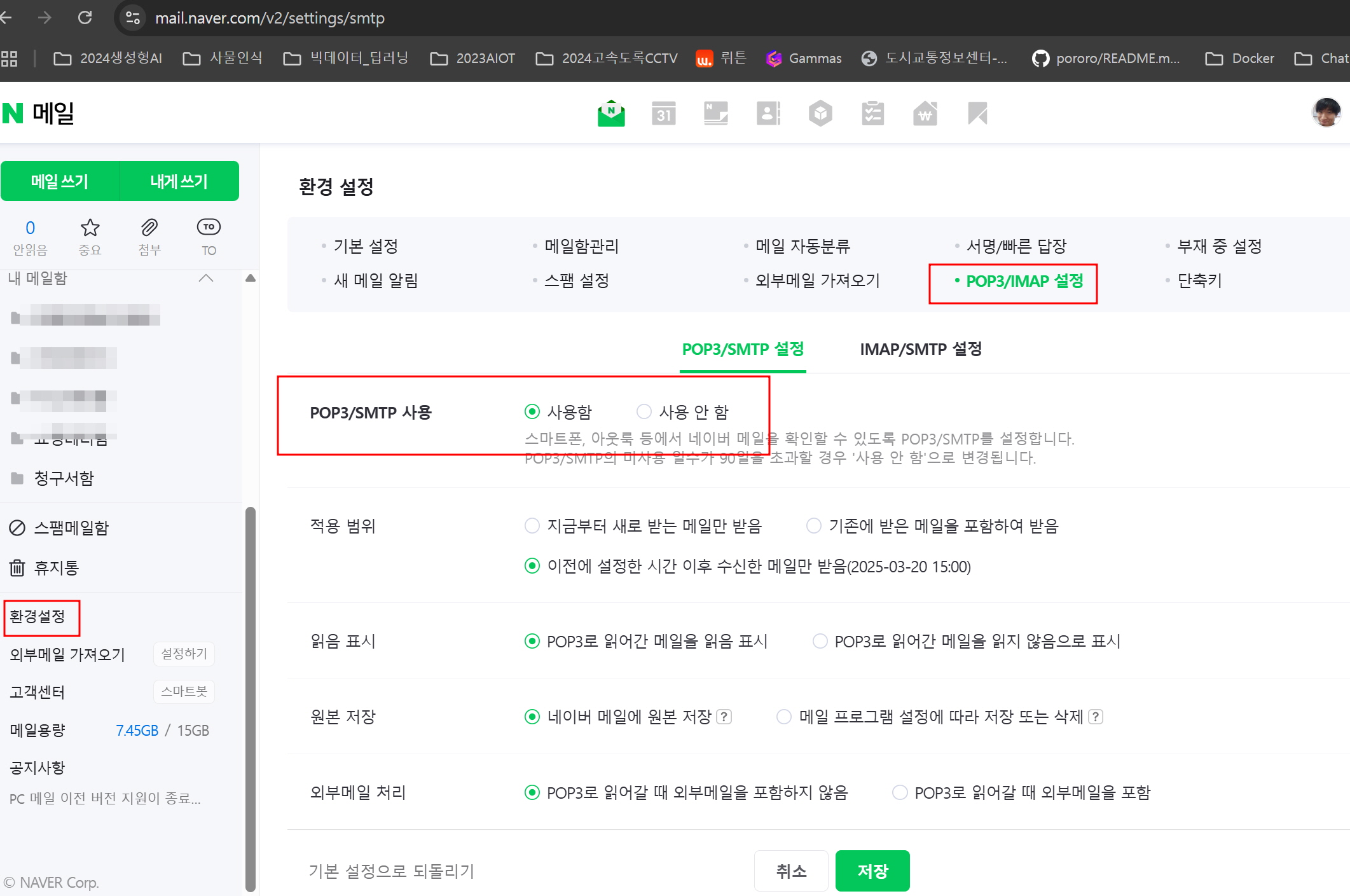
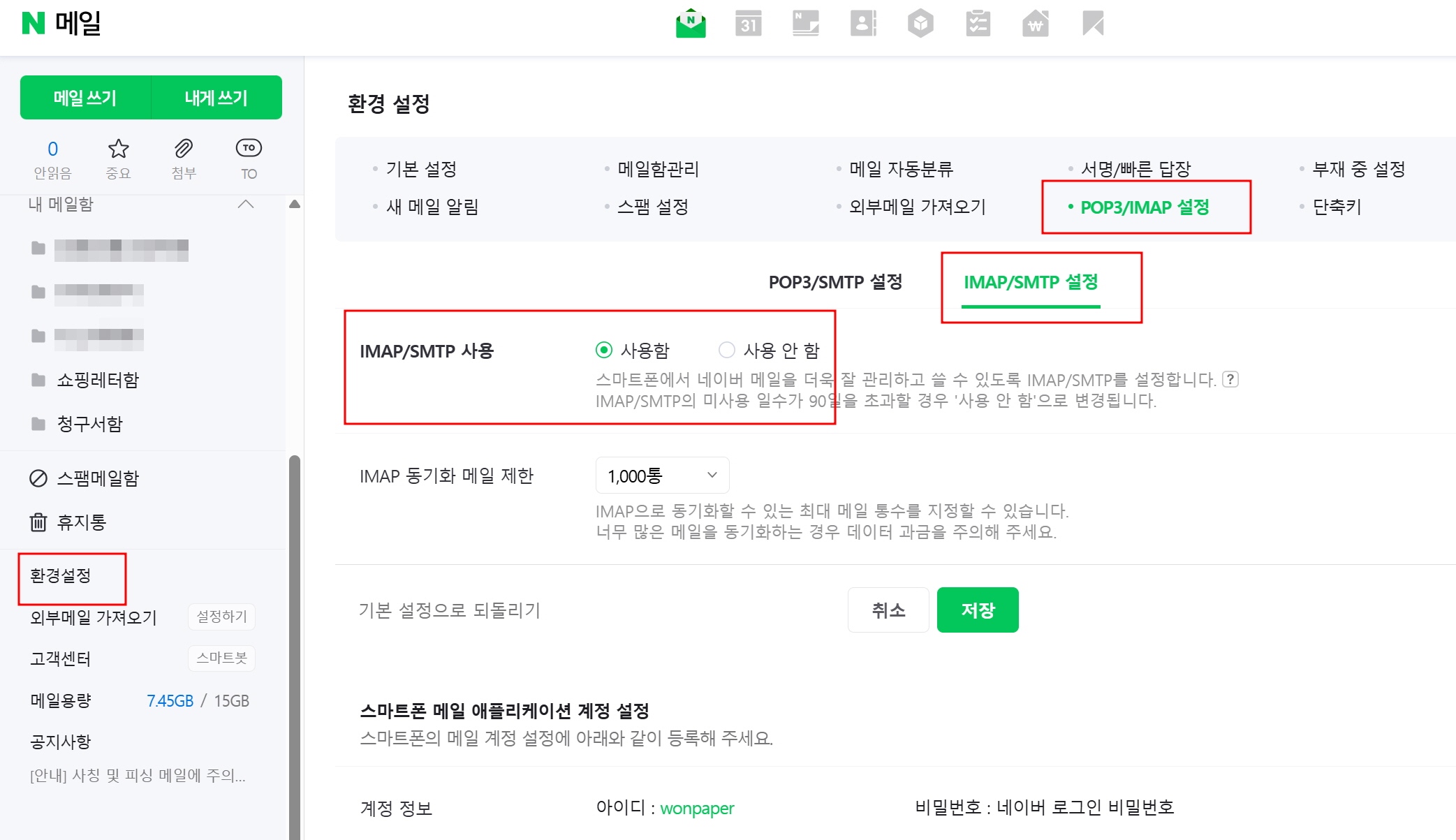
2025년 11월 18일 이후 네이버 메일의 보안 정책이 강화되어
네이버 SMTP 의 경우 기존 TLS 에서 TLS1.2 이상으로 적용되는 서버가 되어야 발송이 가능하다.
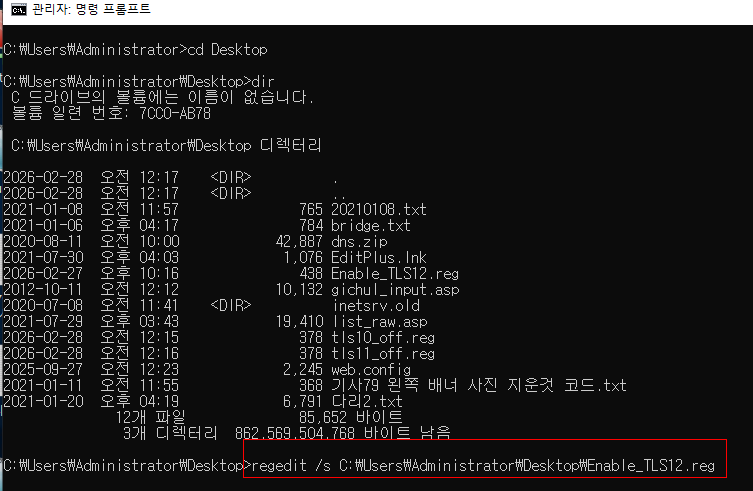
(1) TLS 1.2 활성화 (레지스트리)
메모장에 아래 저장 → enable_tls12.reg
관리자 권한으로 실행 → 서버 재부팅
----------------------------------------
Windows Registry Editor Version 5.00
; TLS 1.2 - Client
[HKEY_LOCAL_MACHINE\SYSTEM\CurrentControlSet\Control\SecurityProviders\SCHANNEL\Protocols\TLS 1.2\Client]
"DisabledByDefault"=dword:00000000
"Enabled"=dword:00000001
; TLS 1.2 - Server
[HKEY_LOCAL_MACHINE\SYSTEM\CurrentControlSet\Control\SecurityProviders\SCHANNEL\Protocols\TLS 1.2\Server]
"DisabledByDefault"=dword:00000000
"Enabled"=dword:00000001
-------------------------------------------
(2) 재부팅 후 다시 TLS 테스트
다시 이 PowerShell 코드 실행
$hostName = "smtp.naver.com"
$port = 465
$tcp = New-Object System.Net.Sockets.TcpClient
$tcp.Connect($hostName, $port)
$ssl = New-Object System.Net.Security.SslStream($tcp.GetStream(), $false, ({ $true }))
$ssl.AuthenticateAsClient($hostName)
"TLS Protocol: $($ssl.SslProtocol)"
----------------------------------------
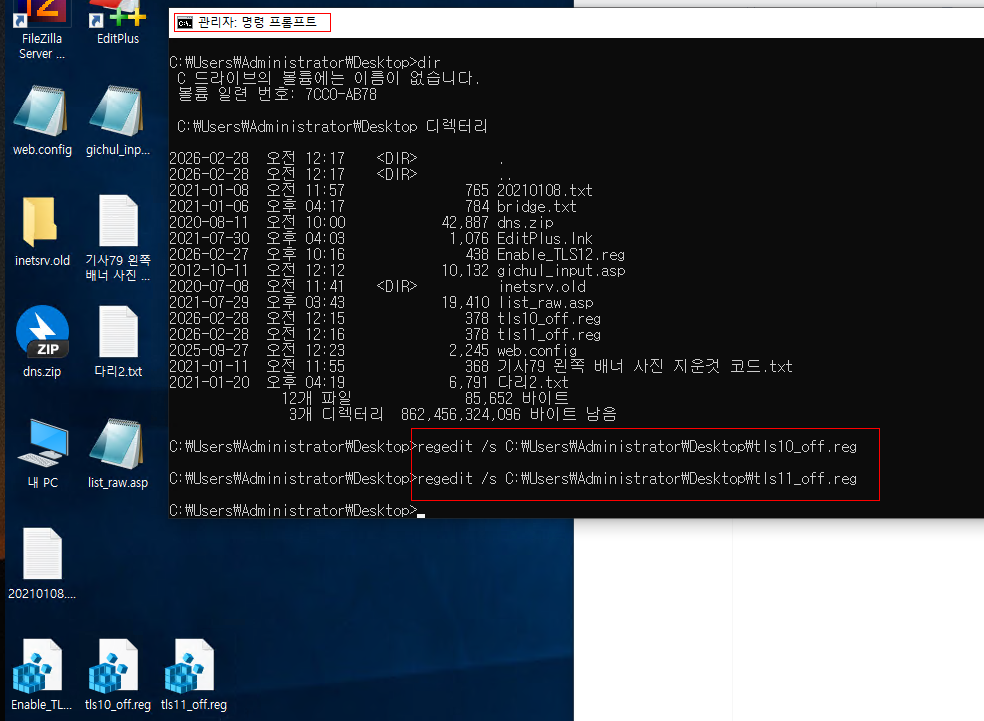
(3) TLS 1.0 끄기 - tls10_off.reg
Windows Registry Editor Version 5.00
[HKEY_LOCAL_MACHINE\SYSTEM\CurrentControlSet\Control\SecurityProviders\SCHANNEL\Protocols\TLS 1.0\Client]
"DisabledByDefault"=dword:00000001
"Enabled"=dword:00000000
[HKEY_LOCAL_MACHINE\SYSTEM\CurrentControlSet\Control\SecurityProviders\SCHANNEL\Protocols\TLS 1.0\Server]
"DisabledByDefault"=dword:00000001
"Enabled"=dword:00000000
-----------------------------------------------
(4) TLS 1.1 끄기 - tls11_off.reg
Windows Registry Editor Version 5.00
[HKEY_LOCAL_MACHINE\SYSTEM\CurrentControlSet\Control\SecurityProviders\SCHANNEL\Protocols\TLS 1.1\Client]
"DisabledByDefault"=dword:00000001
"Enabled"=dword:00000000
[HKEY_LOCAL_MACHINE\SYSTEM\CurrentControlSet\Control\SecurityProviders\SCHANNEL\Protocols\TLS 1.1\Server]
"DisabledByDefault"=dword:00000001
"Enabled"=dword:00000000
-----------------------------------------
cmd (관리자권한으로 실행) ---> regedit /s 해당.reg 파일 실행 --> 서버 재부팅
-----------------------------------------------
"1"개의 인수가 있는 "AuthenticateAsClient"을(를) 호출하는 동안 예외가 발생했습니다.
"원격측에서 전송 스트림을 닫았으므 로 인증에 실패했습니다."
위치 줄:8 문자:1 + $ssl.AuthenticateAsClient($hostName) +
CategoryInfo : NotSpecified: (:) [], MethodInvocationException + FullyQualifiedErrorId : IOException
에러 발생
-----------------------------------------------
(5) .NET이 “TLS 1.2를 기본값”으로 쓰게 설정 - Enable_DotNet_TLS12.reg
Windows Registry Editor Version 5.00
; ===== .NET Framework 4.x (64-bit) =====
[HKEY_LOCAL_MACHINE\SOFTWARE\Microsoft\.NETFramework\v4.0.30319]
"SystemDefaultTlsVersions"=dword:00000001
"SchUseStrongCrypto"=dword:00000001
; ===== .NET Framework 4.x (32-bit on 64-bit OS) =====
[HKEY_LOCAL_MACHINE\SOFTWARE\WOW6432Node\Microsoft\.NETFramework\v4.0.30319]
"SystemDefaultTlsVersions"=dword:00000001
"SchUseStrongCrypto"=dword:00000001
; ===== .NET Framework 2.0/3.5 (64-bit) =====
[HKEY_LOCAL_MACHINE\SOFTWARE\Microsoft\.NETFramework\v2.0.50727]
"SystemDefaultTlsVersions"=dword:00000001
"SchUseStrongCrypto"=dword:00000001
; ===== .NET Framework 2.0/3.5 (32-bit on 64-bit OS) =====
[HKEY_LOCAL_MACHINE\SOFTWARE\WOW6432Node\Microsoft\.NETFramework\v2.0.50727]
"SystemDefaultTlsVersions"=dword:00000001
"SchUseStrongCrypto"=dword:00000001
---------------------------------------
TLS 버전 테스트하기
|
1
2
3
4
5
6
7
8
9
10
11
12
13
14
|
$hostName = "smtp.naver.com"
>> $port = 465
>>
>> $tcp = New-Object System.Net.Sockets.TcpClient
>> $tcp.Connect($hostName, $port)
>>
>> $ssl = New-Object System.Net.Security.SslStream($tcp.GetStream(), $false, ({ $true }))
>> $ssl.AuthenticateAsClient($hostName)
>>
>> "TLS Protocol: $($ssl.SslProtocol)"
>> $ssl.Close()
>> $tcp.Close()
TLS Protocol: Tls12
|
cs |
---------------------------------------------------
위의 내용중에서 ASP 메일발송 소스는 그대로 참고하되
최근 25년 12월 네이버 외부 프로그램 보안 강화 정책 관계로 다음과 같이 추가 2단계보안 인증 + 애플리케이션 비밀번호 생성키를 추가해야 정상적으로 메일이 발송된다.
다음 내용을 참고하길 바란다.
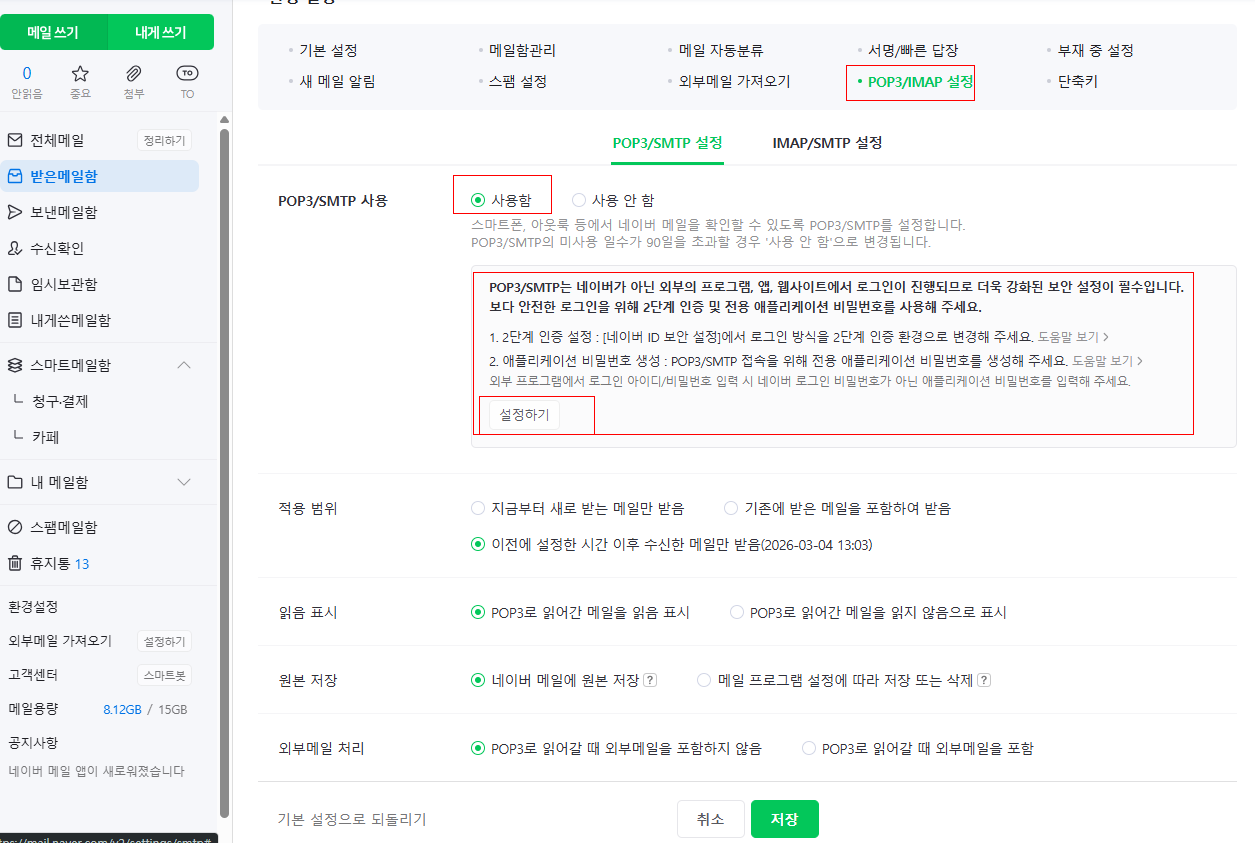
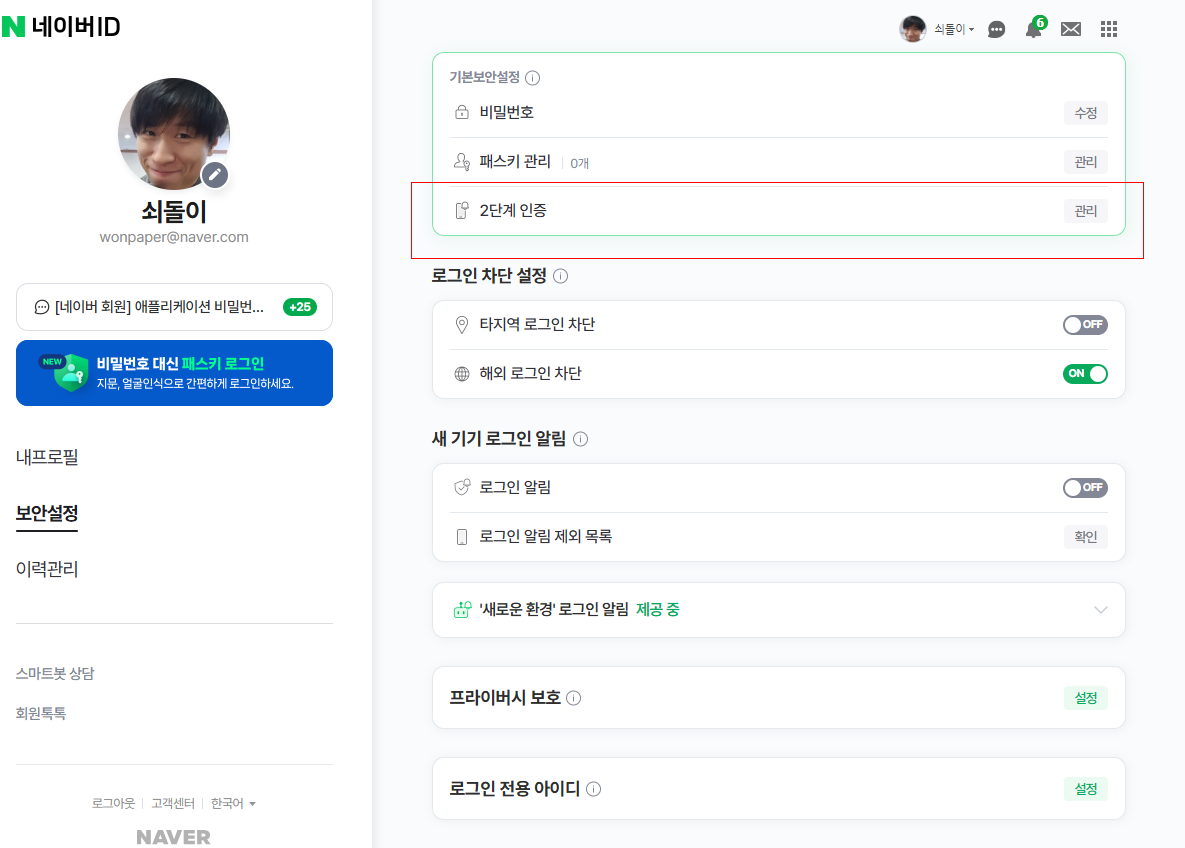
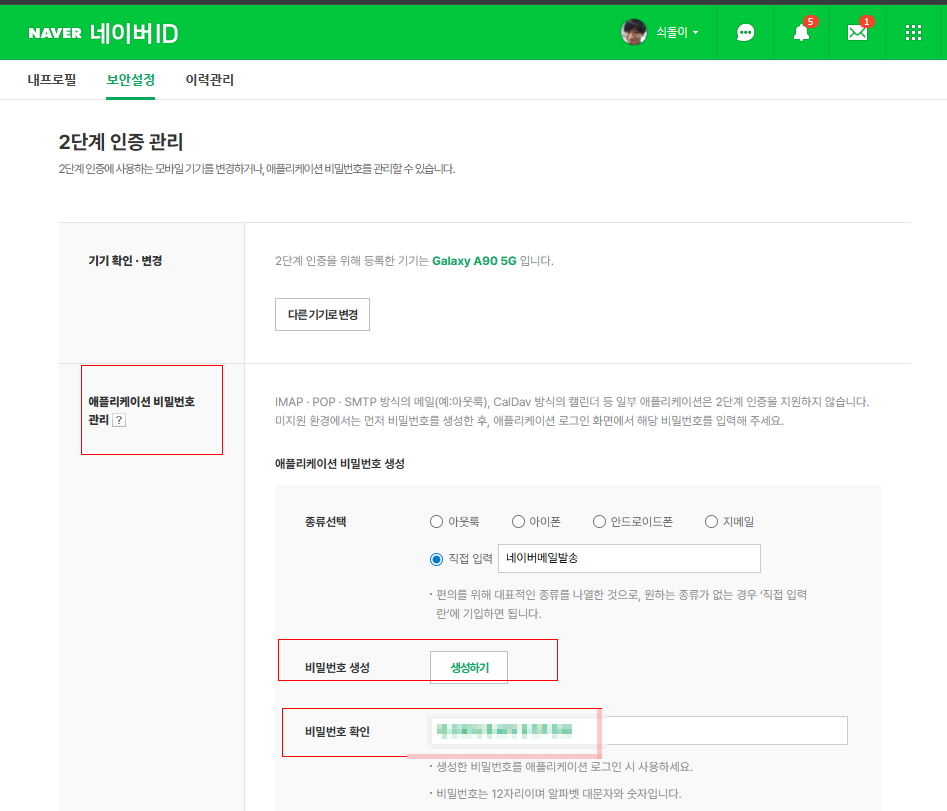
위의 마지막 이미지중에 생성된 비밀번호를 ASP 메일발송 비밀번호에 넣고 465 포트로 발송하면 된다.
'ASP' 카테고리의 다른 글
| [ASP] 네이버에디터로 글 내용 수정시 소스태그로 에러날때 - 따옴표처리 (0) | 2021.04.13 |
|---|---|
| [ASP] VBScript runtime error '800a0006' Overflow 에러 대처법 (0) | 2020.11.21 |
| [ASP] 모바일인지 pc인체 체크하기 (0) | 2020.10.18 |
| [ASP] ActiveX component can't create object: 'MSXML2.DOMDocument 4.0' 에러처리 (0) | 2020.10.12 |
| [ASP] 3초후 페이지 로딩하기 (페이지 로딩 지연시키기) (0) | 2020.06.13 |
