
- javascript 바코드 생성
- asp.net core swagger
- javascript redirection
- asp.net Select
- swagger 500 error
- Mac Oracle
- django 엑셀불러오기
- 강제이동
- 맥 오라클설치
- XSS방어
- simpe ftp
- ASP.Net Core 404
- asp.net dropdownlist
- JavaScript
- ViewBag
- jquery 바코드생성
- 원격ftp
- asp.net core Select
- SSD 복사
- 하드 윈도우 복사
- asp ftp
- ViewData
- 바코드 생성하기
- 말줄임표시
- 하드 마이그레이션
- 타임피커
- XSS PHP
- php 캐쉬제거
- TempData
- 404에러페이지
웹개발자의 기지개
[Python] 쇼핑몰 상품 크롤링하기1 본문
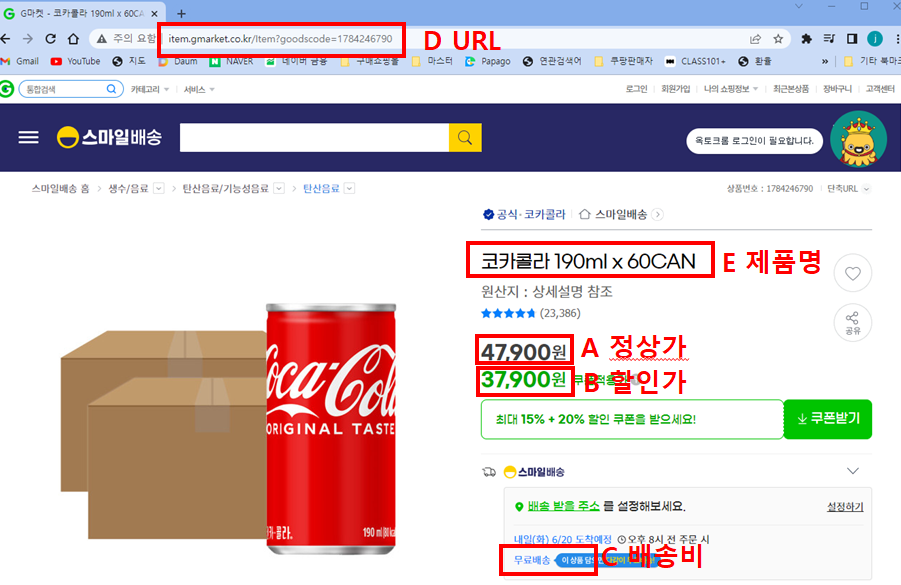
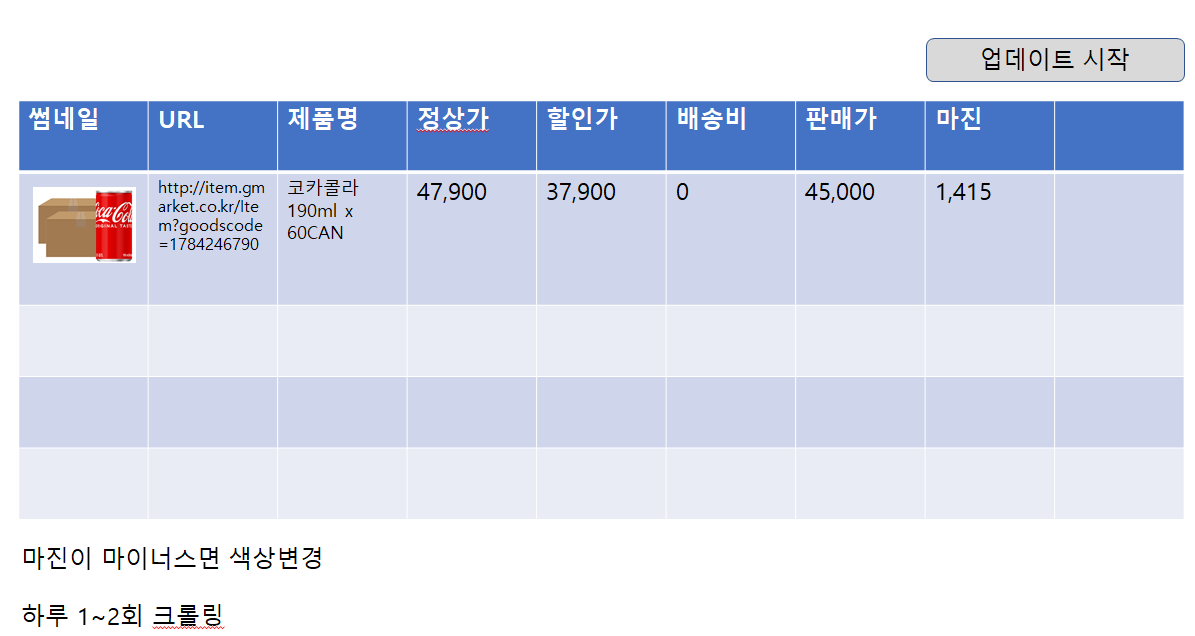
[파이썬 가상환경 설정]
F:\python_basic 폴더에서 가상환경설정하기
F:\python -m venv python_basic 하면 지금과같이
F:\python_basic 폴더안에 Lib, Scripts, Include 폴더등등이 별도로 생성된다.
--------------------------------------------------------------------
1. 파이썬을 설치한다. python 3.0이상버전
F:\python_basic 폴더를 기본폴더로 설명한다.
F:\python_basic
F:\python_basic\cd Scripts
F:\python_basic\Scripts>pip list --> 설치된 라이브러리 확인한다.
2. 관련 pip 라이브러리를 설치 및 확인한다.
F:\python_basic\Scripts>pip install beautifulsoup4
F:\python_basic\Scripts>pip install requests
F:\python_basic\Scripts>pip install pandas
F:\python_basic\Scripts>pip install openpyxl
3. 가상환경 실행한다.
F:\python_basic\Scripts>activate
(python_basic) F:\python_basic\Scripts>
3. 크롤링 파일을 실행한다.
(python_basic) F:\python_basic\Scripts>cd ..
(python_basic) F:\python_basic>python craw1.py
4. 결과 엑셀파일 확인한다.
craw1_excel_gmarket.xlsx 확인
craw1_url.xlsx 는 입력받는 G마켓 url 상품파일
[ 크롤링전 준비사항 ]
python 은 먼저 설치한다.
# pip 설치항목 확인
pip list
pip install beautifulsoup4
pip install requests
pip install pandas
[ craw1.py ]
|
1
2
3
4
5
6
7
8
9
10
11
12
13
14
15
16
17
18
19
20
21
22
23
24
25
26
27
28
29
30
31
32
33
34
35
36
37
38
39
40
41
42
43
44
45
46
47
48
49
50
51
52
53
54
55
56
57
58
59
60
61
62
63
64
65
66
67
68
|
import requests
from bs4 import BeautifulSoup as bs
import pandas as pd
import datetime
itemList = ["http://item.gmarket.co.kr/item?goodscode=1784246790", "http://item.gmarket.co.kr/Item?goodscode=2254667413"]
goods_names = []
prices1 = []
prices2 = []
baesongs = []
img_urls = []
for item in itemList:
res = requests.get(item)
soup = bs(res.content, 'html.parser')
# 제품명
goods_name = soup.find('h1', attrs={"class" : "itemtit"}).get_text()
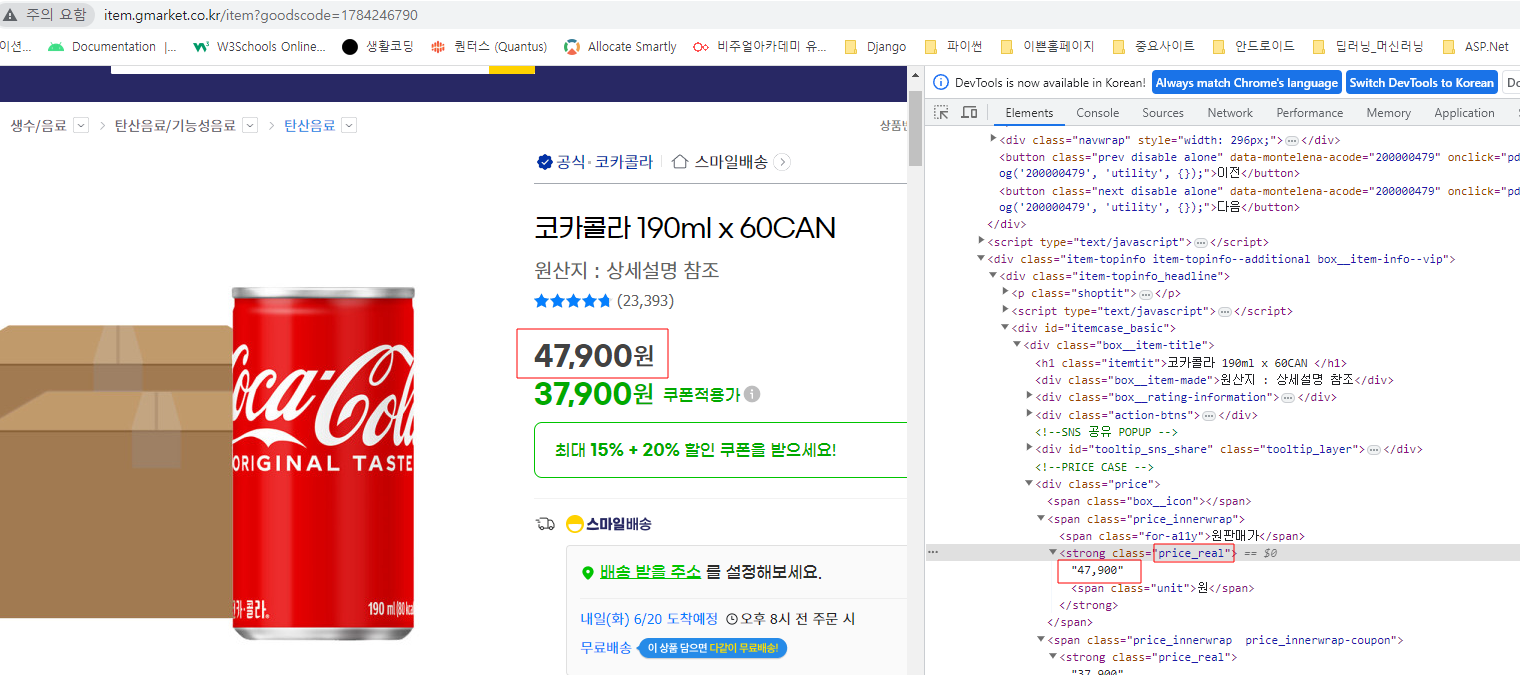
price = [] # 정상가 price[0] , 할인가 price[1]
priceList = soup.find_all('strong', attrs={"class":"price_real"})
for pr in priceList:
price.append(pr.get_text())
# 배송비
baesong = soup.find('span', attrs={"class":"txt_emp"}).get_text()
if baesong !="무료배송":
baesong = soup.find('em', attrs={"class":"txt_default"}).get_text()
baesong = baesong.strip("배송비").strip("원")
price[0] = price[0].strip("원")
price[1] = price[1].strip("원")
# 이미지
#img = soup.find('ul', attrs={"class" : "viewer"}).select("li.on a img")
img_url = soup.find('ul', attrs={"class" : "viewer"}).find("img")
#print(goods_name)
#print(price[0])
#print(price[1])
#print(baesong)
#print(img_url['src'])
#print()
goods_names.append(goods_name)
prices1.append(price[0])
prices2.append(price[1])
baesongs.append(baesong)
img_urls.append(img_url['src'])
dt_now = datetime.datetime.now()
today = datetime.datetime.strftime(dt_now,'%Y-%m-%d')
excelSheet = "G마켓 " + today
df = pd.DataFrame()
df['URL'] = img_urls
df['제품명'] = goods_names
df['정상가'] = prices1
df['할인가'] = prices2
df['배송비'] = baesongs
df.to_excel('./craw1_excel.xlsx', sheet_name=excelSheet)
|
cs |

참고 : https://library.gabia.com/contents/9239/
'python' 카테고리의 다른 글
| [Colab] 구글 코랩에서 파이썬 버전 선택변경하기 (0) | 2024.06.05 |
|---|---|
| [python] 파이썬 map 함수 정리 (0) | 2023.11.10 |
| [Python] datetime 와 strftime()과 strptime() 비교 (1) | 2022.05.06 |
| [Python] 윤년 구하기 (0) | 2022.03.11 |
| [Python] KOA Studio실행시 OpenAPI OCX 오류 해결방법 (0) | 2021.05.20 |
