
- SSD 복사
- asp.net core Select
- 타임피커
- django 엑셀불러오기
- javascript 바코드 생성
- asp.net Select
- asp ftp
- php 캐쉬제거
- 바코드 생성하기
- 말줄임표시
- 원격ftp
- 하드 마이그레이션
- 404에러페이지
- JavaScript
- ViewBag
- asp.net dropdownlist
- Mac Oracle
- swagger 500 error
- jquery 바코드생성
- TempData
- 하드 윈도우 복사
- XSS방어
- javascript redirection
- simpe ftp
- ASP.Net Core 404
- 맥 오라클설치
- 강제이동
- XSS PHP
- asp.net core swagger
- ViewData
웹개발자의 기지개
[Python] 특정 웹사이트 크롤링 1 - mysql DB 저장 본문
pip install --upgrade pip
pip install beautifulsoup4
pip install requests
pip install pandas
|
1
2
3
4
5
6
7
8
9
10
11
12
13
14
15
16
17
18
19
20
21
22
23
24
25
26
27
28
29
30
31
32
33
34
35
36
37
38
39
40
41
42
43
44
45
46
47
|
import requests
from bs4 import BeautifulSoup
import pandas as pd
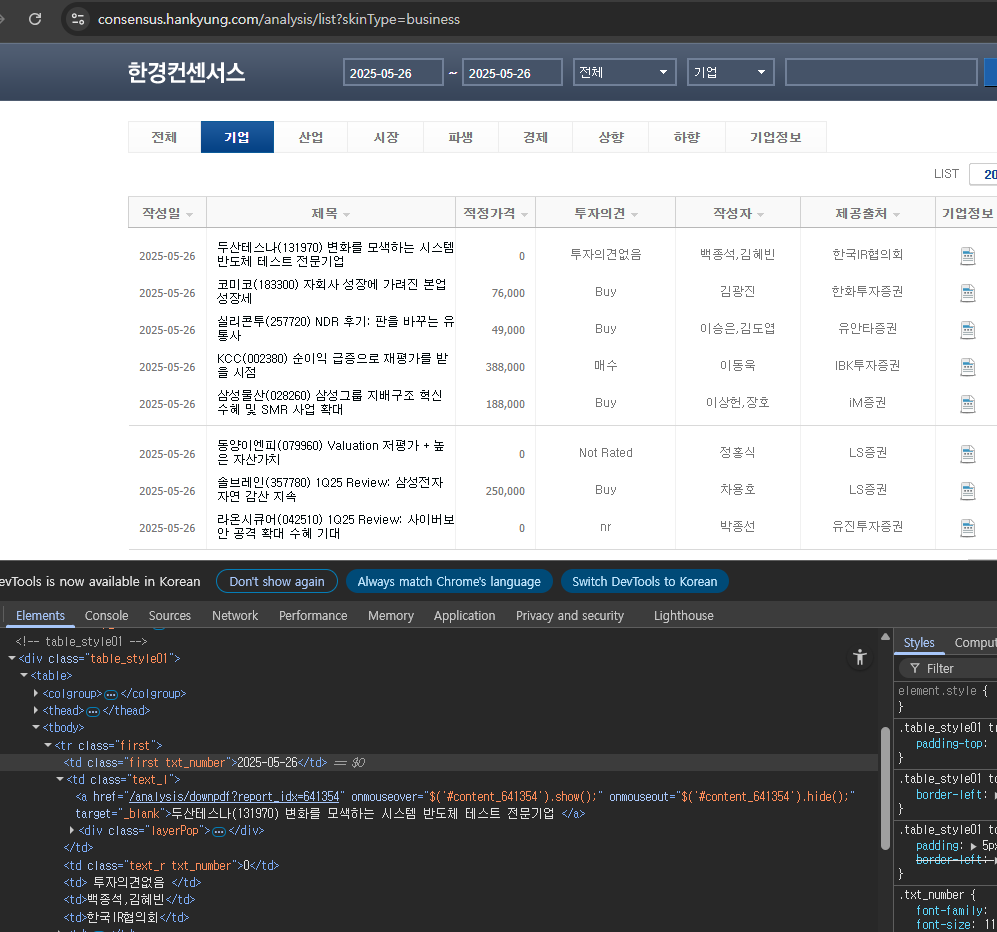
url = "https://consensus.hankyung.com/analysis/list?skinType=business"
# User-Agent 설정 (크롤링 차단 우회용)
headers = {
"User-Agent": "Mozilla/5.0 (Windows NT 10.0; Win64; x64) AppleWebKit/537.36 (KHTML, like Gecko) Chrome/120.0 Safari/537.36"
}
# 요청
response = requests.get(url, headers=headers)
soup = BeautifulSoup(response.text, "html.parser")
# 테이블 rows 가져오기
rows = soup.select("table tbody tr")
#print(rows[0].text)
print(rows[0].select_one("td.first").text.strip()) # 2025-05-26
print(rows[0].select_one("td.text_l a").text.strip()) #두산테스나(131970) 변화를 모색하는 시스템 반도체 테스트 전문기업
print(rows[0].select('td')[3].text.strip()) # 투자의견없음
print(rows[0].select('td')[4].text.strip()) # 백종석, 김혜빈
#pass
print()
# 결과 저장
results = []
for row in rows:
try:
date = row.select_one("td.first").text.strip()
title = row.select_one("td.text_l a").text.strip().split(' ')[0]
opinion = row.select("td")[3].text.strip()
results.append({
"date": date,
"title": title,
"opinion": opinion
})
except Exception as e:
continue # 누락된 행 무시
# 결과 출력
for item in results:
print(item)
|
cs |
[실행화면]
2025-05-26
두산테스나(131970) 변화를 모색하는 시스템 반도체 테스트 전문기업
투자의견없음
백종석,김혜빈
{'date': '2025-05-26', 'title': '두산테스나(131970)', 'opinion': '투자의견없음'}
{'date': '2025-05-26', 'title': '코미코(183300)', 'opinion': 'Buy'}
{'date': '2025-05-26', 'title': '실리콘투(257720)', 'opinion': 'Buy'}
{'date': '2025-05-26', 'title': 'KCC(002380)', 'opinion': '매수'}
{'date': '2025-05-26', 'title': '삼성물산(028260)', 'opinion': 'Buy'}
{'date': '2025-05-26', 'title': '동양이엔피(079960)', 'opinion': 'Not Rated'}
{'date': '2025-05-26', 'title': '솔브레인(357780)', 'opinion': 'Buy'}
{'date': '2025-05-26', 'title': '라온시큐어(042510)', 'opinion': 'nr'}
(*) 주의할점은 headers 부분의 정보를 꼭 넣어두자.
CORS 문제 때문에 과거에는 이를 배제해도 크롤링 실행에 문제가 없었으나, 최근에 다양한 브라우저의 보안기능이 강화되면서 이를 명기해야 정상적으로 작동한다.
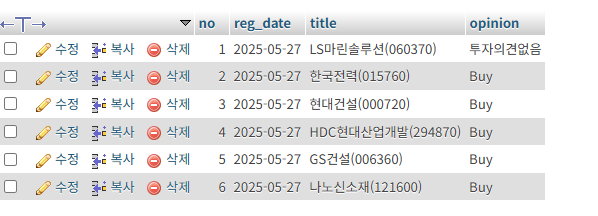
이번에는 추가로 크롤링한 텍스트들을 mysql DB에 저장하는 로직도 넣어보자
CREATE TABLE `consensus` (
`no` int(11) UNSIGNED NOT NULL,
`reg_date` varchar(30) NOT NULL,
`title` varchar(100) NOT NULL,
`opinion` varchar(50) NOT NULL
) ENGINE=InnoDB DEFAULT CHARSET=utf8mb4
ALTER TABLE `consensus`
ADD PRIMARY KEY (`no`);
pip install pymysql
|
1
2
3
4
5
6
7
8
9
10
11
12
13
14
15
16
17
18
19
20
21
22
23
24
25
26
27
28
29
30
31
32
33
34
35
36
37
38
39
40
41
42
43
44
45
46
47
48
49
50
51
52
53
54
55
56
57
58
59
60
61
62
63
64
65
66
67
68
69
70
71
72
73
74
75
76
77
78
|
import requests
from bs4 import BeautifulSoup
import pandas as pd
import pymysql
url = "https://consensus.hankyung.com/analysis/list?skinType=business"
# User-Agent 설정 (크롤링 차단 우회용)
headers = {
"User-Agent": "Mozilla/5.0 (Windows NT 10.0; Win64; x64) AppleWebKit/537.36 (KHTML, like Gecko) Chrome/120.0 Safari/537.36"
}
# 요청
response = requests.get(url, headers=headers)
soup = BeautifulSoup(response.text, "html.parser")
# 테이블 rows 가져오기
rows = soup.select("table tbody tr")
#print(rows[0].text)
print(rows[0].select_one("td.first").text.strip()) # 2025-05-26
print(rows[0].select_one("td.text_l a").text.strip()) #두산테스나(131970) 변화를 모색하는 시스템 반도체 테스트 전문기업
print(rows[0].select('td')[3].text.strip()) # 투자의견없음
print(rows[0].select('td')[4].text.strip()) # 백종석, 김혜빈
#pass
print()
# 결과 저장
results = []
for row in rows:
try:
date = row.select_one("td.first").text.strip()
title = row.select_one("td.text_l a").text.strip().split(' ')[0]
opinion = row.select("td")[3].text.strip()
results.append({
"date": date,
"title": title,
"opinion": opinion
})
except Exception as e:
continue # 누락된 행 무시
# 1. MariaDB 연결 설정
connection = pymysql.connect(
host='localhost', # 또는 MariaDB가 설치된 IP 주소
user='test11', # 사용자 계정
password='test11', # 비밀번호
database='test11', # 사용할 데이터베이스 이름
charset='utf8mb4',
cursorclass=pymysql.cursors.DictCursor
)
try:
with connection.cursor() as cursor:
# 3. SQL INSERT 쿼리
sql = "INSERT INTO consensus (reg_date, title, opinion) VALUES (%s, %s, %s)"
# 4. 하나씩 INSERT
for item in results:
cursor.execute(sql, (item['date'], item['title'], item['opinion']))
# 5. 변경사항 커밋
connection.commit()
print("데이터가 성공적으로 삽입되었습니다.")
except Exception as e:
print("에러 발생:", e)
finally:
connection.close()
# 결과 출력
for item in results:
print(item)
|
cs |
'python' 카테고리의 다른 글
| [Python] 가상환경 생성오류 - Error: Command '['/ai_study/consensus/bin/python3', '-Im', 'ensurepip', '--upgrade', '--default-pip']' returned non-zero exit status 1 (0) | 2025.05.27 |
|---|---|
| [Python] Ubuntu 에서 파이썬 버전 여러개 설치 (0) | 2025.05.27 |
| [Python] Youtube 자막 텍스트만 뽑아내기 (0) | 2025.05.26 |
| [Python] ipynb 파일을 html, pdf 변환하기 (0) | 2025.05.25 |
| [Python] dataclass 의 사용법 (0) | 2025.05.15 |